Appearance
OpenClaw
在 OpenClaw 中配置 Axis Api
OpenClaw 是一个开源个人 AI 助手,支持 WhatsApp、Telegram、Slack、Discord 等 24+ 消息平台。
安装
bash
npm install -g openclaw@latest使用 CC Switch 配置(推荐)
打开 CC Switch,选择顶部 OpenClaw 标签,点击 + 添加配置:
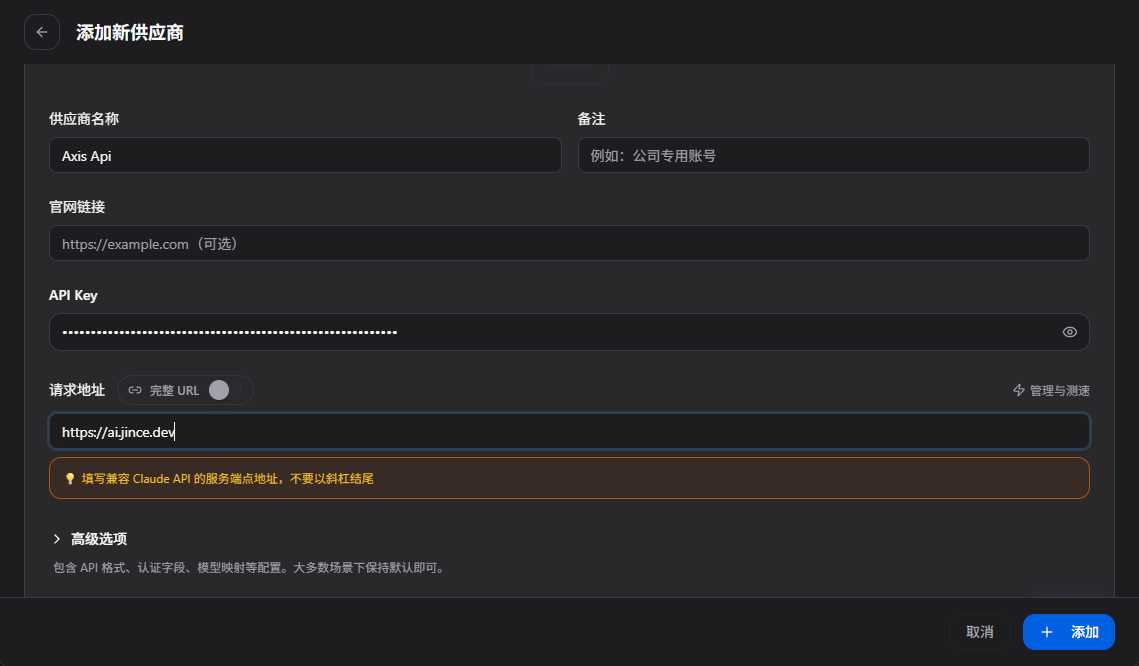
| 字段 | 填写内容 |
|---|---|
| 供应商名称 | 自定义,如 Axis Api |
| API Key | 你的 Key |
| 请求地址 | https://ai.jince.dev/v1 |
手动配置
在 OpenClaw 配置中添加 Axis Api:
json5
{
  models: {
    providers: {
      axis_api: {
        baseUrl: "https://ai.jince.dev/v1",
        apiKey: "sk-你的KEY",
        api: "openai",
        models: [
          { id: "claude-sonnet-4-7", contextWindow: 200000 },
          { id: "gpt-4o", contextWindow: 128000 }
        ]
      }
    }
  },
  agents: {
    defaults: {
      model: { primary: "axis_api/claude-sonnet-4-7" }
    }
  }
}
切换模型
修改配置中的 model.primary 字段,或在 CC Switch 中切换。
INFO
官方文档:docs.openclaw.ai